概要
Arduino IDE (2.3.10)のサンプルスケッチにNTPサーバーから現在の時間を取得するプログラムが有ります。今回はその説明。
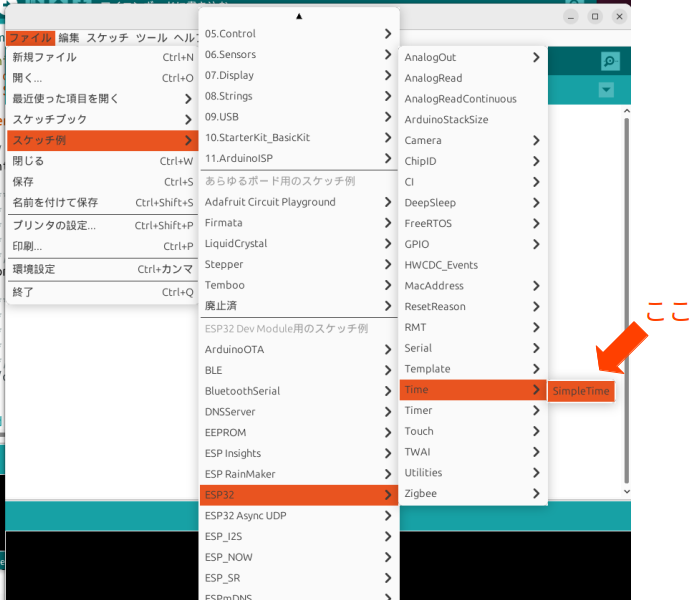
サンプルスケッチの場所
サンプルスケッチは ファイルー>スケッチ例ー>ESP32ー>Timeー>SimpleTimeに有ります。
以下はそのコード。
#include <WiFi.h>
#include "time.h"
#include "esp_sntp.h"

const char *ssid = "YOUR_SSID";
const char *password = "YOUR_PASS";

const char *ntpServer1 = "pool.ntp.org";
const char *ntpServer2 = "time.nist.gov";
const long gmtOffset_sec = 3600;
const int daylightOffset_sec = 3600;

const char *time_zone = "CET-1CEST,M3.5.0,M10.5.0/3";  // TimeZone rule for Europe/Rome including daylight adjustment rules (optional)

void printLocalTime() {
  struct tm timeinfo;
  if (!getLocalTime(&timeinfo)) {
    Serial.println("No time available (yet)");
    return;
  }
  Serial.println(&timeinfo, "%A, %B %d %Y %H:%M:%S");
}

// Callback function (gets called when time adjusts via NTP)
void timeavailable(struct timeval *t) {
  Serial.println("Got time adjustment from NTP!");
  printLocalTime();
}

void setup() {
  Serial.begin(115200);

  // First step is to configure WiFi STA and connect in order to get the current time and date.
  Serial.printf("Connecting to %s ", ssid);
  WiFi.begin(ssid, password);

  /**
   * NTP server address could be acquired via DHCP,
   *
   * NOTE: This call should be made BEFORE esp32 acquires IP address via DHCP,
   * otherwise SNTP option 42 would be rejected by default.
   * NOTE: configTime() function call if made AFTER DHCP-client run
   * will OVERRIDE acquired NTP server address
   */
  esp_sntp_servermode_dhcp(1);  // (optional)

  while (WiFi.status() != WL_CONNECTED) {
    delay(500);
    Serial.print(".");
  }
  Serial.println(" CONNECTED");

  // set notification call-back function
  sntp_set_time_sync_notification_cb(timeavailable);

  /**
   * This will set configured ntp servers and constant TimeZone/daylightOffset
   * should be OK if your time zone does not need to adjust daylightOffset twice a year,
   * in such a case time adjustment won't be handled automagically.
   */
  configTime(gmtOffset_sec, daylightOffset_sec, ntpServer1, ntpServer2);

  /**
   * A more convenient approach to handle TimeZones with daylightOffset
   * would be to specify a environment variable with TimeZone definition including daylight adjustmnet rules.
   * A list of rules for your zone could be obtained from https://github.com/esp8266/Arduino/blob/master/cores/esp8266/TZ.h
   */
  //configTzTime(time_zone, ntpServer1, ntpServer2);
}

void loop() {
  delay(5000);
  printLocalTime();  // it will take some time to sync time :)
}
- void configTime(long gmtOffset_sec, int daylightOffset_sec, const char* server1, const char* server2, const char* server3);
- NTPサーバーから時間データを取得
- 各引数の説明
- long gmtOffset_sec: GMTとローカル時刻との差(単位は秒)
- int daylightOffset_sec: 夏時間で進める時間(単位は秒)。
- const char* server1 NTPサーバ。最低一つ設定する。
- const char* server2
- const char* server3
- 日本の場合、各引数は以下の様になります。
- gmtOffset_sec: 9 * 3600
- daylightOffset_sec:0 (夏時間は無い)
- NTPサーバ:最低でも1個、最大3個指定出来ます。今回は例題通り。
- スケッチの流れ
- WiFiに接続
- configTime(gmtOffset_sec, daylightOffset_sec, ntpServer1, ntpServer2); で時間を取得
- getLocalTime()で時間を表示。
- sntp_set_time_sync_notification_cb(timeavailable);
- 関数configTime()は非同期関数。関数の処理完了を待たずに次へ進みます。
- 処理完了後実行する関数(CallBack関数)をこの関数で指定します。
スケッチを実行すると以下の様にシリアルモニタに表示されます。
configTime()とgetLocalTime()の関係
configTime()を実行するとgetLocalTime()がconfigTime()で取得した時間に自動でセットされます。 つまり時間を取得する為に毎回NTPサーバにアクセスする必要がなくなります。これは便利。
と喜んでいたらESP32のRTCは外部クロック(32kHz)を繋がないと精度が悪い事を思い出しました。 定期的にNPTサーバにアクセスして時間を更新する必要が有ります。更新は面倒だなと思っていたらちゃんと更新関数が用意されていました。
NTPサーバとの接続関係の関数はesp_sntp.hに定義されていて、
https://github.com/espressif/esp-idf/blob/master/components/lwip/include/apps/esp_sntp.h
にソースが、
https://docs.espressif.com/projects/esp-idf/en/latest/esp32/api-reference/system/system_time.html#functions
に説明が有ります。
定義されている関数は
- sntp_sync_status_t sntp_get_sync_status(void): 交信状態を確認
- void sntp_set_sync_interval(uint32_t interval_ms): SNTP operation時間の設定
- uint32_t sntp_get_sync_interval(void): SNTP operation時間の読み取り
- bool sntp_restart(void): SNTPの再スタート
- void esp_sntp_stop(void): SNTP serviceの停止.
更新を行う関数は "void sntp_set_sync_interval(uint32_t interval_ms)"。例えば1日に一回更新したければ setup() に sntp_set_sync_interval(86400000); (24 x 60 x 60 x 1000) を記述すれば自動で更新されます。
最後に
とても便利な "configTime()"。自動更新したければ "sntp_set_sync_interval()"。必要な関数は既に用意されていました。 これらは長時間稼働し時間管理が必要な自作機の場合とても重宝しそうです。