概要
製作した機器でデータを保存したい事が多々有ります。ESP32にはデータ保存手段の1つとして SDカードをサポートしています。ワンチップCPUとしては十分な機能が備わった優れものです。
サポート関数一覧
主な関数を下記にまとめました。
*カードの管理
| メソッド | 説明 |
SD.begin() | SDカードをマウント(初期化)します。 |
SD.end() | SDカードの接続を解除します。 |
SD.exists(path) | ファイルやディレクトリが存在するか確認します。 |
SD.mkdir(path) | 新しいディレクトリを作成します。 |
SD.rmdir(path) | ディレクトリを削除します(中身が空である必要があります)。 |
SD.remove(path) | ファイルを削除します。 |
SD.rename(oldPath, newPath) | ファイルやディレクトリの名前を変更/移動します。 |
SD.totalBytes() | SDカードの総容量を取得します。 |
SD.usedBytes() | 使用中の容量を取得します。 |
*ファイルのオープン(SD.open())
- 書式: File file = SD.open(path, mode);
- 成功: File オブジェクト
- 失敗: false(空のオブジェクト
- 引数
- path (パス): 必ず /(ルート)から始まる文字列を指定
- mode (オープンモード)
-
モード定数 読み取り 書き込み ファイルがない場合 既存ファイルがある場合 FILE_READ◯ × エラーを返す 先頭から読み取る FILE_WRITE◯ ◯ 新規作成する 末尾に追記する FILE_APPEND◯ ◯ 新規作成する 末尾に追記する
-
*ファイルの操作 (File file = SD.open(path, mode); で製作した "file" に対して)
| メソッド | 説明 |
file.print(...) / file.println(...) | ファイルに文字列や数値を書き込みます。 |
file.write(buf, size) | バイナリデータを書き込みます。 |
file.read() | ファイルから1バイト読み取ります。 |
file.read(buf, size) | 指定したサイズ分をバッファに読み取ります。 |
file.available() | 読み取り可能なデータがあるか確認します。 |
file.seek(pos) | ファイル内の特定の位置に移動します。 |
file.position() | 現在の読み書き位置を取得します。 |
file.size() | ファイルのサイズ(バイト数)を取得します。 |
file.flush() | 書き込みバッファを物理メモリに強制保存します(重要)。 |
file.close() | ファイルを閉じます。 |
機能確認
配線
SDカードはSPIで制御します。各ESP32にはデフォルトの信号ラインが有り下記はその一覧。
| SPI Pin Name | ESP8266 | ESP32 | ESP32‑S2 | ESP32‑S3 | ESP32‑C3 | ESP32‑C6 | ESP32‑H2 |
|---|---|---|---|---|---|---|---|
| CS (SS) | GPIO15 | GPIO5 | GPIO34 | GPIO10 | GPIO7 | GPIO18 | GPIO0 |
| DI (MOSI) | GPIO13 | GPIO23 | GPIO35 | GPIO11 | GPIO6 | GPIO19 | GPIO25 |
| DO (MISO) | GPIO12 | GPIO19 | GPIO37 | GPIO13 | GPIO5 | GPIO20 | GPIO11 |
| SCK (SCLK) | GPIO14 | GPIO18 | GPIO36 | GPIO12 | GPIO4 | GPIO21 | GPIO10 |
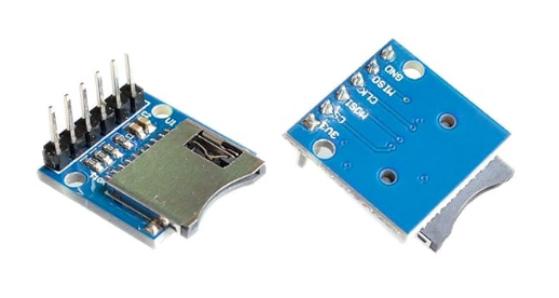
今回は、ESP32S3 に SDカードソケット "マイクロSDカード" をつないで動作確認しています。
サンプルプログラム
サンプルスケッチがArduino IDEの スケッチの例ー>SDー>SD_Test に有ります。
/*
 * pin 1 - not used          |  Micro SD card     |
 * pin 2 - CS (SS)           |                   /
 * pin 3 - DI (MOSI)         |                  |__
 * pin 4 - VDD (3.3V)        |                    |
 * pin 5 - SCK (SCLK)        | 8 7 6 5 4 3 2 1   /
 * pin 6 - VSS (GND)         | ▄ ▄ ▄ ▄ ▄ ▄ ▄ ▄  /
 * pin 7 - DO (MISO)         | ▀ ▀ █ ▀ █ ▀ ▀ ▀ |
 * pin 8 - not used          |_________________|
 *                             ║ ║ ║ ║ ║ ║ ║ ║
 *                     ╔═══════╝ ║ ║ ║ ║ ║ ║ ╚═════════╗
 *                     ║         ║ ║ ║ ║ ║ ╚══════╗    ║
 *                     ║   ╔═════╝ ║ ║ ║ ╚═════╗  ║    ║
 * Connections for     ║   ║   ╔═══╩═║═║═══╗   ║  ║    ║
 * full-sized          ║   ║   ║   ╔═╝ ║   ║   ║  ║    ║
 * SD card             ║   ║   ║   ║   ║   ║   ║  ║    ║
 * Pin name         |  -  DO  VSS SCK VDD VSS DI CS    -  |
 * SD pin number    |  8   7   6   5   4   3   2   1   9 /
 *                  |                                  █/
 *                  |__▍___▊___█___█___█___█___█___█___/
 *
 * Note:  The SPI pins can be manually configured by using `SPI.begin(sck, miso, mosi, cs).`
 *        Alternatively, you can change the CS pin and use the other default settings by using `SD.begin(cs)`.
 *
 * +--------------+---------+-------+----------+----------+----------+----------+----------+
 * | SPI Pin Name | ESP8266 | ESP32 | ESP32‑S2 | ESP32‑S3 | ESP32‑C3 | ESP32‑C6 | ESP32‑H2 |
 * +==============+=========+=======+==========+==========+==========+==========+==========+
 * | CS (SS)      | GPIO15  | GPIO5 | GPIO34   | GPIO10   | GPIO7    | GPIO18   | GPIO0    |
 * +--------------+---------+-------+----------+----------+----------+----------+----------+
 * | DI (MOSI)    | GPIO13  | GPIO23| GPIO35   | GPIO11   | GPIO6    | GPIO19   | GPIO25   |
 * +--------------+---------+-------+----------+----------+----------+----------+----------+
 * | DO (MISO)    | GPIO12  | GPIO19| GPIO37   | GPIO13   | GPIO5    | GPIO20   | GPIO11   |
 * +--------------+---------+-------+----------+----------+----------+----------+----------+
 * | SCK (SCLK)   | GPIO14  | GPIO18| GPIO36   | GPIO12   | GPIO4    | GPIO21   | GPIO10   |
 * +--------------+---------+-------+----------+----------+----------+----------+----------+
 *
 * For more info see file README.md in this library or on URL:
 * https://github.com/espressif/arduino-esp32/tree/master/libraries/SD
 */

#include "FS.h"
#include "SD.h"
#include "SPI.h"

/*
Uncomment and set up if you want to use custom pins for the SPI communication
#define REASSIGN_PINS
int sck = -1;
int miso = -1;
int mosi = -1;
int cs = -1;
*/

void listDir(fs::FS &fs, const char *dirname, uint8_t levels) {
  Serial.printf("Listing directory: %s\n", dirname);

  File root = fs.open(dirname);
  if (!root) {
    Serial.println("Failed to open directory");
    return;
  }
  if (!root.isDirectory()) {
    Serial.println("Not a directory");
    return;
  }

  File file = root.openNextFile();
  while (file) {
    if (file.isDirectory()) {
      Serial.print("  DIR : ");
      Serial.println(file.name());
      if (levels) {
        listDir(fs, file.path(), levels - 1);
      }
    } else {
      Serial.print("  FILE: ");
      Serial.print(file.name());
      Serial.print("  SIZE: ");
      Serial.println(file.size());
    }
    file = root.openNextFile();
  }
}

void createDir(fs::FS &fs, const char *path) {
  Serial.printf("Creating Dir: %s\n", path);
  if (fs.mkdir(path)) {
    Serial.println("Dir created");
  } else {
    Serial.println("mkdir failed");
  }
}

void removeDir(fs::FS &fs, const char *path) {
  Serial.printf("Removing Dir: %s\n", path);
  if (fs.rmdir(path)) {
    Serial.println("Dir removed");
  } else {
    Serial.println("rmdir failed");
  }
}

void readFile(fs::FS &fs, const char *path) {
  Serial.printf("Reading file: %s\n", path);

  File file = fs.open(path);
  if (!file) {
    Serial.println("Failed to open file for reading");
    return;
  }

  Serial.print("Read from file: ");
  while (file.available()) {
    Serial.write(file.read());
  }
  file.close();
}

void writeFile(fs::FS &fs, const char *path, const char *message) {
  Serial.printf("Writing file: %s\n", path);

  File file = fs.open(path, FILE_WRITE);
  if (!file) {
    Serial.println("Failed to open file for writing");
    return;
  }
  if (file.print(message)) {
    Serial.println("File written");
  } else {
    Serial.println("Write failed");
  }
  file.close();
}

void appendFile(fs::FS &fs, const char *path, const char *message) {
  Serial.printf("Appending to file: %s\n", path);

  File file = fs.open(path, FILE_APPEND);
  if (!file) {
    Serial.println("Failed to open file for appending");
    return;
  }
  if (file.print(message)) {
    Serial.println("Message appended");
  } else {
    Serial.println("Append failed");
  }
  file.close();
}

void renameFile(fs::FS &fs, const char *path1, const char *path2) {
  Serial.printf("Renaming file %s to %s\n", path1, path2);
  if (fs.rename(path1, path2)) {
    Serial.println("File renamed");
  } else {
    Serial.println("Rename failed");
  }
}

void deleteFile(fs::FS &fs, const char *path) {
  Serial.printf("Deleting file: %s\n", path);
  if (fs.remove(path)) {
    Serial.println("File deleted");
  } else {
    Serial.println("Delete failed");
  }
}

void testFileIO(fs::FS &fs, const char *path) {
  File file = fs.open(path);
  static uint8_t buf[512];
  size_t len = 0;
  uint32_t start = millis();
  uint32_t end = start;
  if (file) {
    len = file.size();
    size_t flen = len;
    start = millis();
    while (len) {
      size_t toRead = len;
      if (toRead > 512) {
        toRead = 512;
      }
      file.read(buf, toRead);
      len -= toRead;
    }
    end = millis() - start;
    Serial.printf("%u bytes read for %lu ms\n", flen, end);
    file.close();
  } else {
    Serial.println("Failed to open file for reading");
  }

  file = fs.open(path, FILE_WRITE);
  if (!file) {
    Serial.println("Failed to open file for writing");
    return;
  }

  size_t i;
  start = millis();
  for (i = 0; i < 2048; i++) {
    file.write(buf, 512);
  }
  end = millis() - start;
  Serial.printf("%u bytes written for %lu ms\n", 2048 * 512, end);
  file.close();
}

void setup() {
  Serial.begin(115200);

#ifdef REASSIGN_PINS
  SPI.begin(sck, miso, mosi, cs);
  if (!SD.begin(cs)) {
#else
  if (!SD.begin()) {
#endif
    Serial.println("Card Mount Failed");
    return;
  }
  uint8_t cardType = SD.cardType();

  if (cardType == CARD_NONE) {
    Serial.println("No SD card attached");
    return;
  }

  Serial.print("SD Card Type: ");
  if (cardType == CARD_MMC) {
    Serial.println("MMC");
  } else if (cardType == CARD_SD) {
    Serial.println("SDSC");
  } else if (cardType == CARD_SDHC) {
    Serial.println("SDHC");
  } else {
    Serial.println("UNKNOWN");
  }

  uint64_t cardSize = SD.cardSize() / (1024 * 1024);
  Serial.printf("SD Card Size: %lluMB\n", cardSize);

  listDir(SD, "/", 0);
  createDir(SD, "/mydir");
  listDir(SD, "/", 0);
  removeDir(SD, "/mydir");
  listDir(SD, "/", 2);
  writeFile(SD, "/hello.txt", "Hello ");
  appendFile(SD, "/hello.txt", "World!\n");
  readFile(SD, "/hello.txt");
  deleteFile(SD, "/foo.txt");
  renameFile(SD, "/hello.txt", "/foo.txt");
  readFile(SD, "/foo.txt");
  testFileIO(SD, "/test.txt");
  Serial.printf("Total space: %lluMB\n", SD.totalBytes() / (1024 * 1024));
  Serial.printf("Used space: %lluMB\n", SD.usedBytes() / (1024 * 1024));
}

void loop() {}
コンパイルと実行
コンパイル前に、IDEを下記の様に設定して下さい。
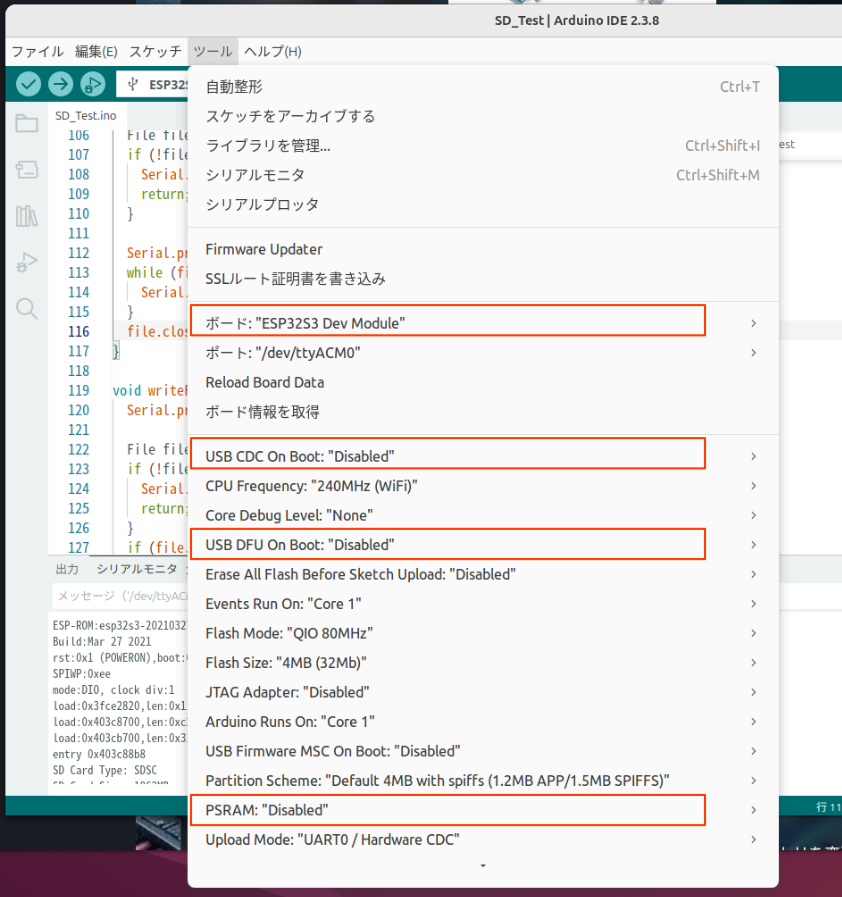
- ボード: ESP32S3 Dev Module
- USB CDC On Boot: Disabled
- USB DFU On Boot: Disabled
- PSRAM: Disabled
設定後、SDカードソケットにフォーマット後の何も書かれていないメディアを入れて コンパイル実行して下さい。シリアルモニタに下記が表示されます。
赤字の部分がこのスケッチの出力です。今回は2GBのカードを使っています。 コードで使用している関数を、*カードの管理 *ファイルの操作を参照しながら シリアルモニタに出力された結果と共に追って見て下さい。自作製品に使うには 十分過ぎる機能です。
追加説明
*「テキストモード」と「バイナリーモード」が無い
標準Cライブラリのような書式 "rb" や "w" などが無い。すべて「バイナリー」として扱われる。 「テキスト」と「バイナリー」の区別はユーザが関数で使い分ける。
-
目的 使うメソッド 挙動 テキスト print(),println()数値を文字列に変換して書き込む(例: 123→"123")バイナリー write()データをそのままのバイト値で書き込む(例: 0x7B)読み取り read()/readBytes()1バイトずつ、またはまとめてバイト列として読み取る
* println() と print()
ESP32で println() を使うと、デフォルトでは \r\n (CRLF) が書き込まれる。 \n(LF)のみ書き込みたい時は print() を使う。
* ディレクトリに移動するという概念が無い。
ディレクトリを階層的に作製する事は出来るのですが、ディレクトリに移動する という概念が有りません。ディレクトリに有るファイルにアクセスする時は常にフルパス指定となります。
最後に
ちょっとクセが有りますが、十分な機能です。