音声のみでOK
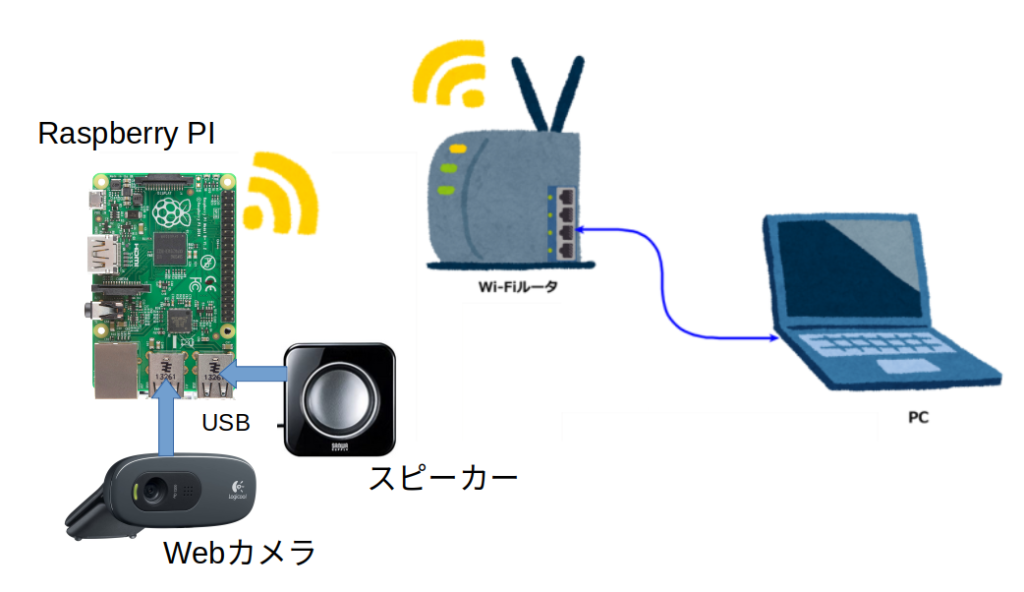
音声と画像を送信しようと思ったのですが、さずがに両方はRaspberry PIへの負担が 大きく、画像を諦め音声のみ送信する事にしました。今回の環境は以下の通り。 前回から USBスピーカが追加されています。
USBスピーカーの設定
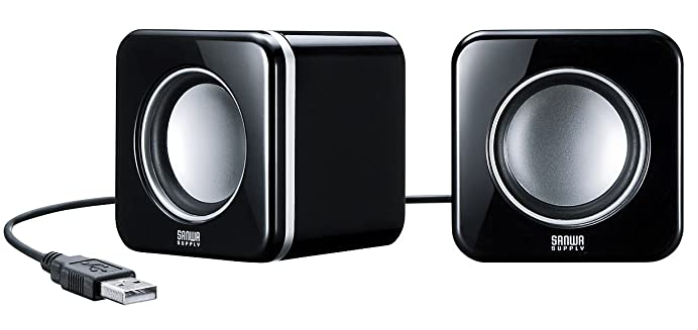
今回使用したUSBスピーカーは、 サンワサプライ コンパクトPCスピーカー USB接続 ブラック MM-SPU8BK
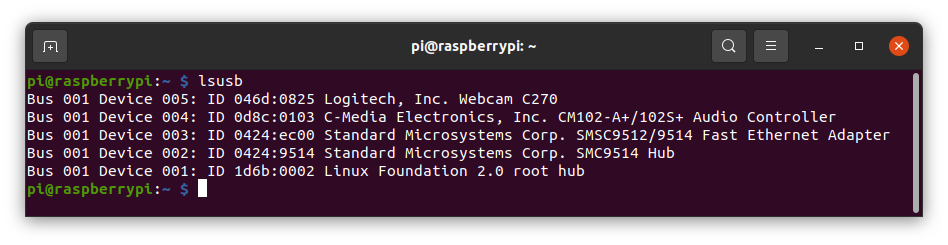
これが lsusb では認識されるのですが、
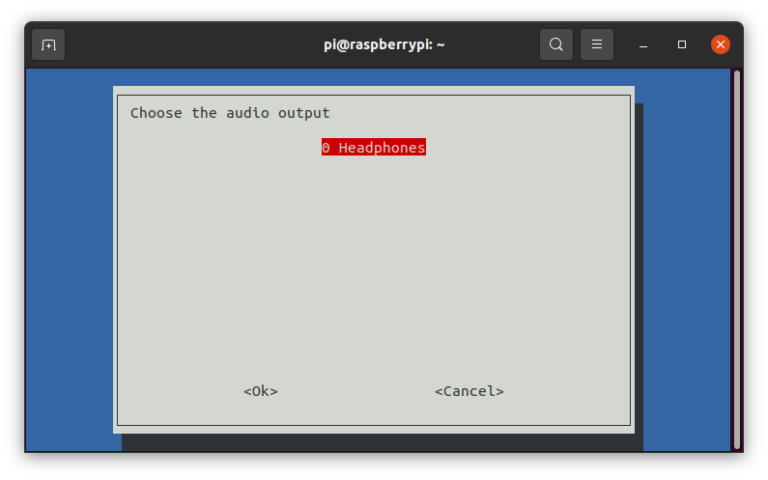
PC側から音を送信するには
WebRTCで相手に映像や音声を送るには下記の関数を使います。
- navigator.mediaDivices.getUserMedia()
- ユーザーにWebカメラとマイクの使用許可を申請後、有効にしてデータを取り込みます。
- 引数: {video: false, audio: true}。false:無効、 true:有効。
- 今回は音のみ有効。navigator.mediaDivices.getUserMedia({video: false, audio: true})。
- addTrack()
- WebRTCのSDPに情報を登録する関数。
- 使用方法
- stream = navigator.mediaDivices.getUserMedia({video: false, audio: true});
stream.getTracks().forEach(track => xxx.addTrack(track, stream));
(xxxは、RTCPeerConnection(); の戻り値)
- stream = navigator.mediaDivices.getUserMedia({video: false, audio: true});
stream.getTracks().forEach(track => xxx.addTrack(track, stream));
これらの関数の適用場所ですが、各々の特徴を考えると
- navigator.mediaDivices.getUserMedia()
- P2Pの接続情報に音声を送る事を追加する必要がある
- ー> createPeerConnection()の前。
- addTrack()
- Raspberry PIと情報交換する前。
- ー> createPeerConnection()の後。
ただ、navigator.mediaDivices.getUserMedia()はPromiseであることに注意。 navigator.mediaDivices.getUserMedia()を実行するとユーザーの許可を求めて来ます。 ユーザーが許可する間にコードは先に進み許可した時点で既にSDPが相手に送られ音声登録が出来ない可能性が生じます。 それを防ぐ為にawaitを使用します。(ws.onopen = function () { をasyncで定義)関連する箇所は以下。
ws.onopen = async function () {
    iceCandidates = [];
    remoteDesc = false;
    audio_video_stream = await navigator.mediaDevices.getUserMedia({video: false, audio: true});
    createPeerConnection();
    audio_video_stream.getTracks().forEach(track => pc.addTrack(track, audio_video_stream));
    var request = {
        what: "call",
        options: {
            force_hw_vcodec: false,
            vformat: "30",
下記は前回の "webrtc.html" にこの修正を加えたHTMLコード "webrtc01.html" です。
<!DOCTYPE html>
<html>
    <head>
        <meta charset="UTF-8">
        <title>UV4L WebRTC</title>
        <script type="text/javascript">

            var ws = null;
            var pc;
            var audio_video_stream;
            var mediaConstraints = {
                optional: [],
                mandatory: {
                    OfferToReceiveAudio: true,
                    OfferToReceiveVideo: true
                }
            };
            var iceCandidates = [];

            function createPeerConnection() {
                try {
                    pc = new RTCPeerConnection();
                    pc.onicecandidate = onIceCandidate;
                    pc.ontrack = onTrack;
                    pc.onremovestream = onRemoteStreamRemoved;
                    console.log("peer connection successfully created!");
               } catch (e) {
                    console.error("createPeerConnection() failed");
                }
            }

            function onIceCandidate(event) {
                if (event.candidate && event.candidate.candidate) {
                    var candidate = {
                        sdpMLineIndex: event.candidate.sdpMLineIndex,
                        sdpMid: event.candidate.sdpMid,
                        candidate: event.candidate.candidate
                    };
                    var request = {
                        what: "addIceCandidate",
                        data: JSON.stringify(candidate)
                    };
                    ws.send(JSON.stringify(request));
                } else {
                    console.log("End of candidates.");
                }
            }

            function addIceCandidates() {
                iceCandidates.forEach(function (candidate) {
                    pc.addIceCandidate(candidate,
                        function () {
                            console.log("IceCandidate added: " + JSON.stringify(candidate));
                        },
                        function (error) {
                            console.error("addIceCandidate error: " + error);
                        }
                    );
                });
                iceCandidates = [];
            }

            function onTrack(event) {
                console.log("Remote track!");
                var remoteVideoElement = document.getElementById('remote-video');
                remoteVideoElement.srcObject = event.streams[0];
            }

            function onRemoteStreamRemoved(event) {
                var remoteVideoElement = document.getElementById('remote-video');
                remoteVideoElement.srcObject = null;
                remoteVideoElement.src = ''; // TODO: remove
            }

           function start() {
                if ("WebSocket" in window) {
                    document.getElementById("stop").disabled = false;
                    document.getElementById("start").disabled = true;
                    document.documentElement.style.cursor = 'wait';

                    var protocol = location.protocol === "https:" ? "wss:" : "ws:";
                    ws = new WebSocket(protocol + '//raspberrypi.local:8090/stream/webrtc');

                    ws.onopen = async function () {
                        iceCandidates = [];
                        remoteDesc = false;
                        audio_video_stream = await navigator.mediaDevices.getUserMedia({video: false, audio: true});
                        createPeerConnection();
                        audio_video_stream.getTracks().forEach(track => pc.addTrack(track, audio_video_stream));
                        var request = {
                            what: "call",
                            options: {
                                force_hw_vcodec: false,
                                vformat: "30",
                                trickle_ice: true
                            }
                        };
                        ws.send(JSON.stringify(request));
                        console.log("call(), request=" + JSON.stringify(request));
                    };

                    ws.onmessage = function (evt) {
                        var msg = JSON.parse(evt.data);
                        if (msg.what !== 'undefined') {
                            var what = msg.what;
                            var data = msg.data;
                        }
                        console.log("message =" + what);

                        switch (what) {
                            case "offer":
                                pc.setRemoteDescription(new RTCSessionDescription(JSON.parse(data)),
                                        function onRemoteSdpSuccess() {
                                            remoteDesc = true;
                                            addIceCandidates();
                                            console.log('onRemoteSdpSucces()');
                                            pc.createAnswer(function (sessionDescription) {
                                                pc.setLocalDescription(sessionDescription);
                                                var request = {
                                                    what: "answer",
                                                    data: JSON.stringify(sessionDescription)
                                                };
                                                ws.send(JSON.stringify(request));
                                                console.log(request);

                                            }, function (error) {
                                                alert("Failed to createAnswer: " + error);

                                            }, mediaConstraints);
                                        },
                                        function onRemoteSdpError(event) {
                                            alert('Failed to set remote description (unsupported codec on this browser?): ' + event);
                                            stop();
                                        }
                                );
                                break;

                            case "iceCandidate": // when trickle is enabled
                                if (!msg.data) {
                                    console.log("Ice Gathering Complete");
                                    break;
                                }
                                var elt = JSON.parse(msg.data);
                                let candidate = new RTCIceCandidate({sdpMLineIndex: elt.sdpMLineIndex, candidate: elt.candidate});
                                iceCandidates.push(candidate);
                                if (remoteDesc)
                                    addIceCandidates();
                                document.documentElement.style.cursor = 'default';
                                break;
                        }
                    };

                    ws.onclose = function (evt) {
                        if (pc) {
                            pc.close();
                            pc = null;
                        }
                        document.getElementById("stop").disabled = true;
                        document.getElementById("start").disabled = false;
                        document.documentElement.style.cursor = 'default';
                    };

                    ws.onerror = function (evt) {
                        alert("An error has occurred!");
                        ws.close();
                    };

                } else {
                    alert("Sorry, this browser does not support WebSockets.");
                }
            }

            function stop() {
                if (audio_video_stream) {
                    try {
                        if (audio_video_stream.getVideoTracks().length)
                            audio_video_stream.getVideoTracks()[0].stop();
                        if (audio_video_stream.getAudioTracks().length)
                            audio_video_stream.getAudioTracks()[0].stop();
                        audio_video_stream.stop(); // deprecated
                    } catch (e) {
                        for (var i = 0; i < audio_video_stream.getTracks().length; i++)
                            audio_video_stream.getTracks()[i].stop();
                    }
                    audio_video_stream = null;
                }
                document.getElementById('remote-video').srcObject = null;
                document.getElementById('remote-video').src = ''; // TODO; remove
                if (pc) {
                    pc.close();
                    pc = null;
                }
                if (ws) {
                    ws.close();
                    ws = null;
                }
                document.getElementById("stop").disabled = true;
                document.getElementById("start").disabled = false;
                document.documentElement.style.cursor = 'default';
            }

        </script>
        <style>
            video {
                background: #eee none repeat scroll 0 0;
                border: 1px solid #aaa;
            }
        </style>
    </head>
    <body>
        <h1><span>WebRTC two-way Audio/Video Intercom</span></h1>
        <video id="remote-video" autoplay="" width="640" height="480">
            Your browser does not support the video tag.
        </video><br>
        <button id="start" style="background-color: green; color: white" onclick="start();">Call!</button>
        <button disabled id="stop" style="background-color: red; color: white" onclick="stop();">Hang up</button>
    </body>
</html>
確認
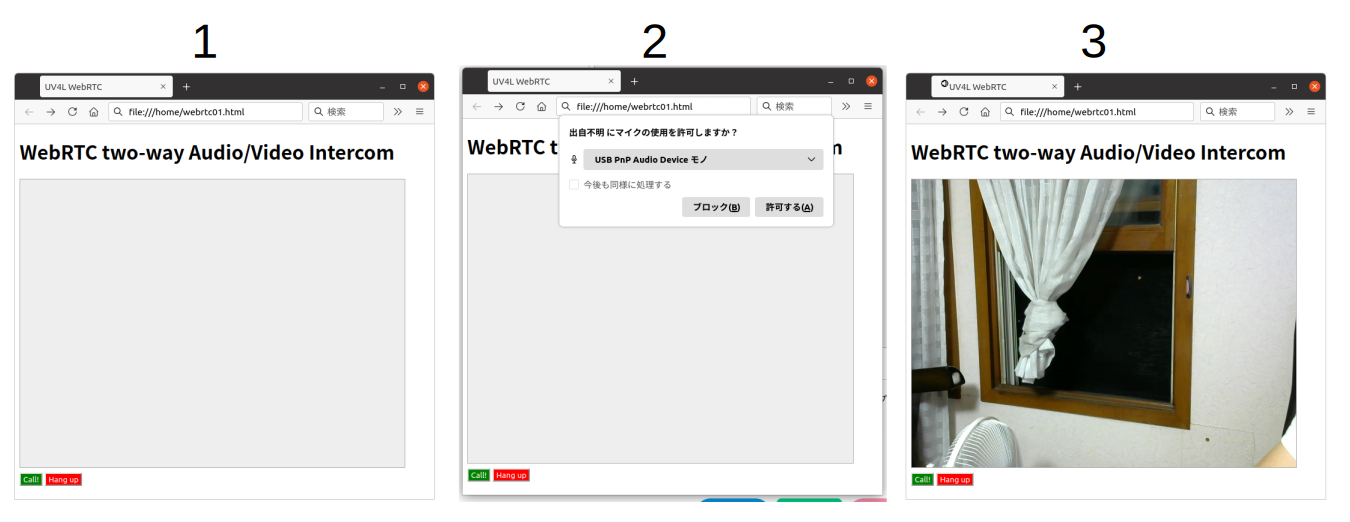
- raspberry-piを上げて、PC側はブラウザ(FireFox)で ”webrtc01.html" を読み込む。
- 画面下の、”Call”ボタンをクリックすると音声許可要求のポップアップが表示されます。
- ポップアップの”許可する”を押すと、Webカメラのランプが点滅します。
- 点滅が点灯に変わるとStreaming開始。
- Raspberry PIから音声と映像が、PCから音声が相手に送信されています。
- ”Hang Up”ボタンをクリックするとStreamingが終了します。
次回は
段々と仕組みが分かって来ました。要望に合わせてHPのコードを変更出来そうです。 実はオリジナルHPのソースコードには スナップショット 録画等の機能が有りました。 次回はこれらの機能を追加したいと思います。